Marketing automation workflow

A marketing automation workflow is a controlled sequence that turns an observed event into a verified next state. A reliable workflow defines the entry event, contact and consent state, actions, acceptance check, exception path, owner, and retained evidence. The messages are only one part of the system: the real test is whether it behaves correctly when data is missing, a person replies, a booking changes, or a handoff fails.
Key facts
- Define the normal path, exception path, owner, and proof together; a sequence of messages alone is not an operating system.
- Use stable contact, run, message, booking, and opportunity identifiers so the workflow can be audited across tools.
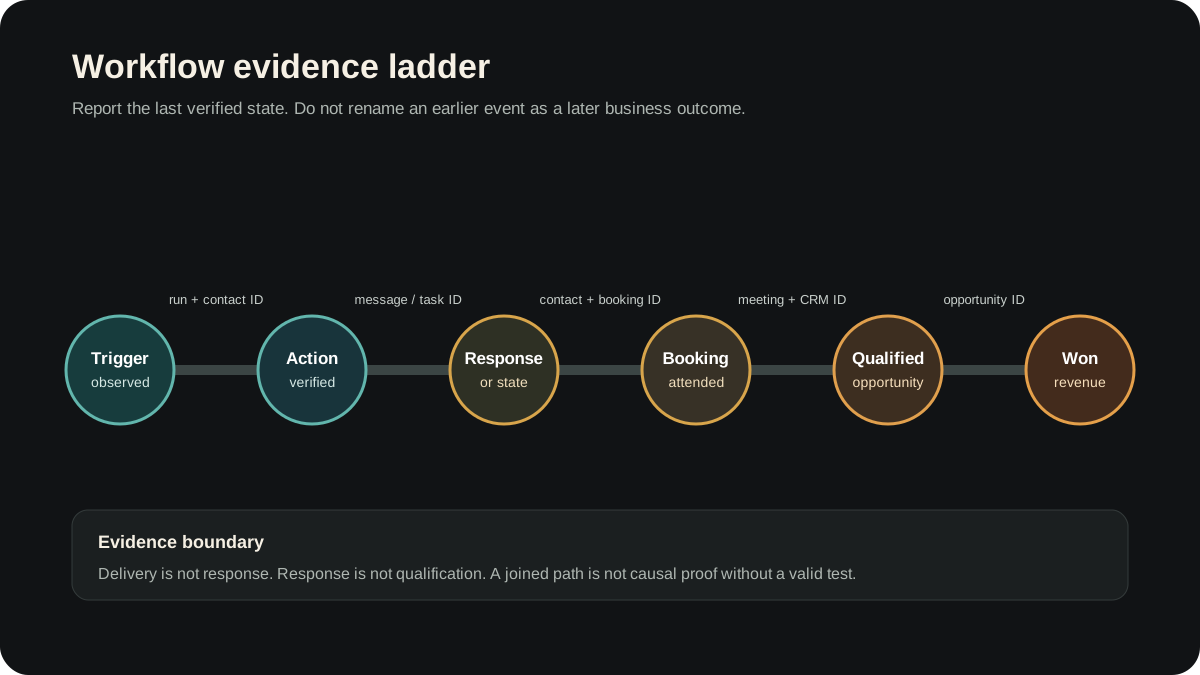
- Separate trigger observed, action delivered, response, booking, qualification, and revenue as distinct evidence states.
- Build one workflow at a time, test the normal path and high-risk exceptions, then monitor it against explicit acceptance checks.
- Prioritize the workflow tied to the clearest current leak rather than building a large generic library.
- Ahrefs estimated 900 monthly US searches and keyword difficulty 8 for marketing automation workflow on August 3, 2026. These are planning estimates, not Vibeera performance.
Marketing automation becomes operational at the workflow level. The useful unit is not an email or a builder canvas. It is a defined state transition: an event is observed, the correct person and context are resolved, actions run, the expected next state is checked, and any exception reaches an owner with enough evidence to repair it.
What a marketing automation workflow is
Every workflow, no matter how complex it looks in a builder, is made of three parts. Understand these and you can read or design any workflow.
- The trigger. The event that starts the workflow, such as a form fill, a booking, a purchase, or a tag being added. Nothing runs until the trigger fires.
- The steps. The actions it takes in order, like send an email, wait two days, send a text, then notify your team. This is the body of the workflow.
- The conditions. The branches that make it smart, like skip the reminder if the person already replied, or stop the sequence if they unsubscribe. Conditions are what keep a workflow from being annoying or wrong.
That is the whole anatomy. A welcome email is a one-step workflow. A multi-touch follow-up with branching for repliers is a richer one. They are the same shape underneath, which is why learning workflows once lets you build all of them.
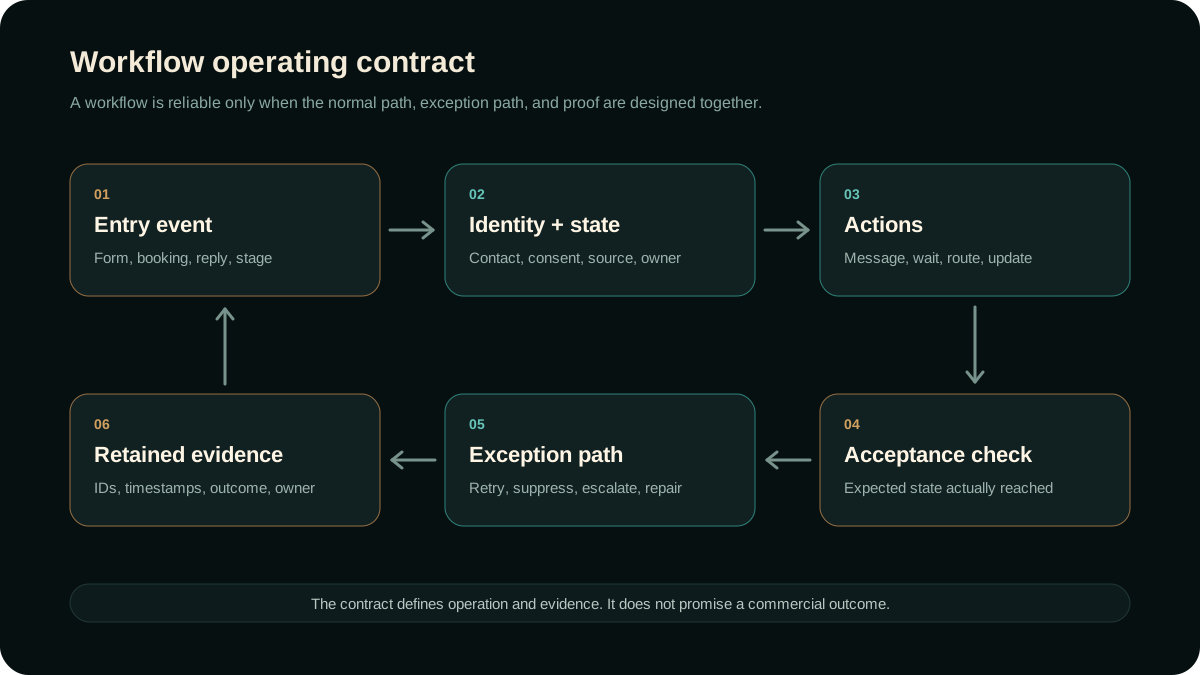
Write the workflow operating contract first
Before opening a workflow builder, write the operating contract in plain language. This is not a legal contract. It is the working definition of what enters the workflow, what must be true, what should happen, what counts as accepted, and who owns the exception.
| Control | Question to answer | Evidence to retain |
|---|---|---|
| Entry event | Which exact event and version can start this workflow? | Event name, source, timestamp, run ID |
| Identity and state | Which contact, consent, lifecycle, source, and owner state must be present? | Contact ID, consent state, source fields, owner |
| Actions | Which message, wait, route, task, or record update should run? | Action ID, content/version, destination, timestamp |
| Acceptance | Which observable state proves the action completed correctly? | Delivery, task, booking, or CRM state |
| Exception | What happens on missing data, reply, unsubscribe, conflict, timeout, or provider failure? | Error class, retry state, suppression, owner |
| Review | When is the workflow kept, repaired, paused, or retired? | Decision, reason, change date, reviewer |
This contract makes a workflow portable across tools. The builder can change while the business rule, evidence boundary, and exception ownership stay explicit.
When the next step depends on context rather than a stable branch, the workflow may need a model-managed decision. The agentic AI in marketing implementation guide shows how to add that judgment without removing approval, evidence, or human ownership.
The common marketing automation workflows
You do not need to invent workflows from scratch. Four cover most of what a business actually needs, and together they catch a lead from first contact through to a re-warmed relationship months later.
Welcome workflow
Triggered when someone signs up, opts in, or buys, the welcome workflow greets them, sets expectations, and delivers whatever they were promised. It runs in the first minutes and hours, when attention is highest, and a good one turns a cold signup into someone who remembers why they raised their hand. Skipping it leaves new contacts to go cold in the gap between interest and your first real touch.
Lead nurture workflow
Triggered for people who are interested but not ready, the nurture workflow keeps in touch over days or weeks with useful, low-pressure messages until the timing is right. Most leads do not buy on day one, and without nurture they simply forget you. This is the workflow that quietly converts the patient majority who were never going to act immediately.
Re-engagement workflow
Triggered when a contact has gone quiet for a defined stretch, the re-engagement workflow tries to win them back with a fresh reason to pay attention. Your existing list is full of people who were once interested and drifted. A re-engagement workflow mines that list instead of always paying to acquire new leads from scratch.
Follow-up workflow
Triggered the instant a new lead arrives, the follow-up workflow replies fast and keeps following up until they respond, then hands off or books a call. This is usually the most valuable workflow of the four, because slow or missing follow-up is where businesses lose the most money. If you build only one workflow, build this one.
The order to build them mirrors where money leaks, which is the same priority a sound marketing automation strategy sets: follow-up first, then welcome and booking, then nurture, then re-engagement once the front of the funnel is solid.
How to build a marketing automation workflow
Building a single workflow is straightforward once you stop trying to build ten at once. The discipline is to build one, prove it, and only then move to the next.
- Choose the trigger. Decide exactly what should start the workflow, such as a specific form fill, a booking, or a tag. A vague trigger fires at the wrong time or not at all.
- List the steps in order. Write out the sequence in plain language first, like email, wait two days, text, wait one day, notify the team. Get the logic right before you touch a builder.
- Add the conditions. Branch it so it behaves: skip the reminder if they already replied, stop if they unsubscribe, route hot leads to a person. Conditions are what separate a helpful workflow from a robotic one.
- Test with a real contact. Run yourself or a teammate through it end to end before turning it on. Most workflow disasters are a missed condition that a single test would have caught.
Then maintain it. Offers, links, and timing change, and a workflow that is set and forgotten drifts out of date and sends the wrong thing. The maintenance is not glamorous, which is exactly why it gets skipped, and why so many DIY workflows quietly rot.
Test the exceptions, not only the happy path
A successful test contact proves only the path that contact took. Before launch, test the states most likely to cause harm or bad reporting: duplicate entry, missing email or phone, existing customer, prior reply, unsubscribe, booking reschedule, cancellation, owner absence, provider timeout, and a record that already sits in a later lifecycle stage.
For each test, record the input state, expected action, observed action, retained identifier, and rollback or cleanup. Use an approved internal test record where a real provider action is necessary. Never create a synthetic contact in a live client system when that contact can trigger real communication without prior approval.
Download the workflow acceptance matrix (CSV) to define the normal path, high-risk exceptions, evidence, owners, and rollback before enabling a workflow.
Measure the last joined business state
A workflow run is not a business result. Keep the trigger, contact, action, reply, booking, meeting, opportunity, and revenue identifiers joinable, then report the last state the evidence actually supports. An email marked delivered is not a reply. A reply is not a booking. A booking is not a qualified opportunity, and a qualified opportunity is not won revenue.
A joined path describes what was observed under a stated attribution model. It does not prove that the workflow caused the outcome by itself. Offer quality, channel, timing, sales execution, seasonality, and other changes may also move.
How many workflows do you actually need?
Far fewer than tool marketing implies. The instinct after buying software is to build dozens of clever workflows, but more is not better. A solid foundation is the four above, plus appointment reminders and a reporting summary, and that already covers the journey a lead takes from first touch to repeat customer. A small set that is well built, tested, and maintained beats a sprawl of half-finished workflows that misfire, overlap, and slowly erode trust in the whole system. When workflows fail, it is almost never because there were too few. It is because the ones that existed were never tested or kept current.
Operated versus DIY workflows
This is the fork that decides whether your workflows actually get built well and stay correct. Both paths are legitimate and suit different businesses.
DIY means you build each workflow, wire the triggers and conditions, test them, and maintain them as your business changes. It buys full control and costs you mostly time and attention. It suits a business with someone who has the hours and likes the work. The hidden cost is upkeep: workflows are not build-once, they are tend-forever.
An operated approach installs and runs the workflows for you. Vibeera, an AI marketing agency that installs and operates AI-supported marketing systems, maps the contract, builds the workflow, tests the normal and exception paths, and monitors the retained evidence while the business keeps strategy, offer, approvals, and brand voice. The tradeoff is less direct control inside the builder and a higher cost than raw software, in exchange for named operating ownership.
| Dimension | DIY workflows | Operated AI approach |
|---|---|---|
| Who builds them | You, from a blank builder | Built and tested for you |
| Who maintains them | You, as offers and channels change | Operated and kept current for you |
| Real cost | Low software fee plus your build and upkeep time | Higher fee that covers the work and the upkeep |
| Time to working | Depends on available build, test, and maintenance capacity | Depends on scope, access, integrations, approvals, and exception coverage |
| Main risk | A half-built workflow that misfires or stalls unnoticed | Less hands-on control over the internals |
| What stays yours | The strategy, the offer, and brand voice | The strategy, the offer, and brand voice |
So what workflows should you build?
Start with the workflow tied to the clearest current leak. If new leads wait without a response, start with lead follow-up. If booked prospects miss calls, start with reminders, rescheduling, and owner escalation. If contacts disappear after an initial conversation, start with state-aware nurture. Keep the set small enough to test and review, then decide whether internal capacity or an operated model will own the maintenance.
Research method and evidence boundary
Ahrefs Keyword Explorer was checked August 3, 2026. It estimated 900 monthly US searches, keyword difficulty 8, global volume 2,500, topic traffic potential 1,000, and cost per click of $0.40 for marketing automation workflow. The close variant marketing workflow automation was estimated at 250 monthly US searches, keyword difficulty 11, global volume 1,000, and the same topic traffic potential. These are third-party planning estimates, can change, and do not establish Vibeera traffic, ranking, conversion, or causation.
Current HubSpot documentation was checked August 10, 2026 for workflow enrollment triggers and workflow testing. It supports distinguishing trigger configuration from testing behavior in a named platform. It does not prove that Vibeera's control model improves outcomes in every system.
The workflow operating contract, acceptance-matrix template, exception test model, and evidence ladder are Vibeera operator analysis. They are quality controls, not customer-result claims, performance guarantees, or universal benchmarks.
Related reading
Frequently asked questions
What is a marketing automation workflow?
A marketing automation workflow is a sequence of marketing actions that fire automatically when a trigger happens, without anyone doing them by hand. A workflow has three parts: a trigger that starts it, like a form fill or a booking; the steps it runs, like sending an email, waiting, then sending a text; and the conditions that branch it, like skip the reminder if the person already replied. It is the building block of marketing automation. The strategy decides what you automate, and workflows are how each piece actually runs.
What are the most common marketing automation workflows?
Four workflows cover most of what a business needs. A welcome workflow greets and onboards a new lead or customer right after they sign up. A lead nurture workflow keeps in touch with people who are interested but not ready, until they are. A re-engagement workflow wins back contacts who have gone quiet. A follow-up workflow replies fast and keeps following up with new leads until they respond. Of these, the follow-up workflow usually matters most, because slow or missing follow-up is where businesses lose the most money.
How do you build a marketing automation workflow?
Build a workflow in four steps. First, choose the trigger that should start it, such as a form fill, a booking, or a tag. Second, list the steps in order, like email, wait two days, then text. Third, add the conditions that branch it, so it skips a reminder if the person already replied or stops if they unsubscribe. Fourth, test it with a real contact before turning it on. Start with one workflow, prove it, then build the next, because launching many untested workflows at once is how quality slips.
How many marketing automation workflows does a business need?
Most businesses need only a handful of workflows, not dozens. A solid foundation is four: follow-up for new leads, a welcome for new signups, nurture for people who are not ready, and re-engagement for contacts who have gone quiet. Adding appointment reminders and a reporting summary rounds it out. More workflows are not better. A small set that is well built, tested, and maintained beats a sprawl of half-finished ones that misfire and erode trust in the whole system.
Should you build marketing automation workflows yourself or have them operated for you?
It depends on your scarcest resource. DIY tools let you build the workflows yourself, which suits a business with time and someone who enjoys the work, but the hidden cost is keeping every workflow correct as offers and channels change. An operated approach installs and runs the workflows for you, so they get built, tested, and maintained without you babysitting them. Vibeera, an AI marketing agency that installs and operates a department of AI agents, builds and runs the workflows while you keep the strategy and brand voice.
Curious what your own AI would do first?
We map the trigger, state, actions, exceptions, evidence, and operating owner to your business.
See it run your business